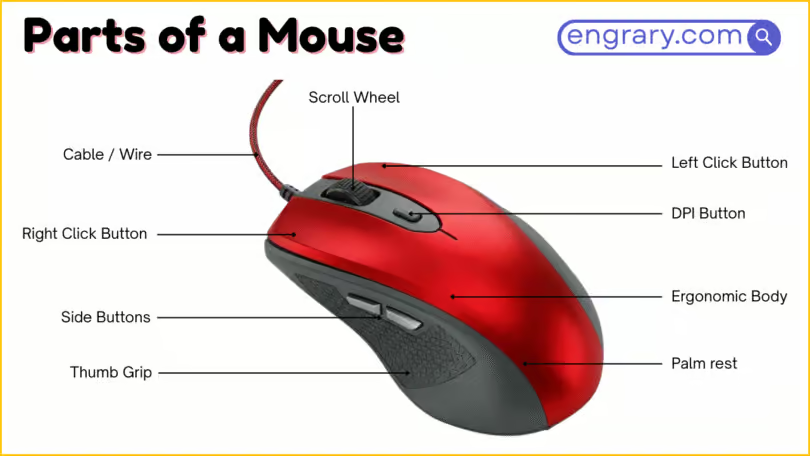
A mouse has several visible outer parts and internal hardware sections that support clicking, tracking, grip, and connection. The main groups include the mouse body, top controls, side parts, bottom sensor parts, and internal connection features, while smaller parts such as the DPI button, thumb rest, optical sensor, mouse feet, and switch help each section perform a more specific role.
First, it helps to see the mouse as one connected device rather than a group of separate labels. You’ll learn how each mouse part looks, what it is used for, and how to tell one from another, while also seeing how the top controls handle clicking and scrolling, the side and bottom parts support grip and tracking, and the internal and connection parts help the mouse send signals and work smoothly with a device.
Mouse Parts Labeled Diagram
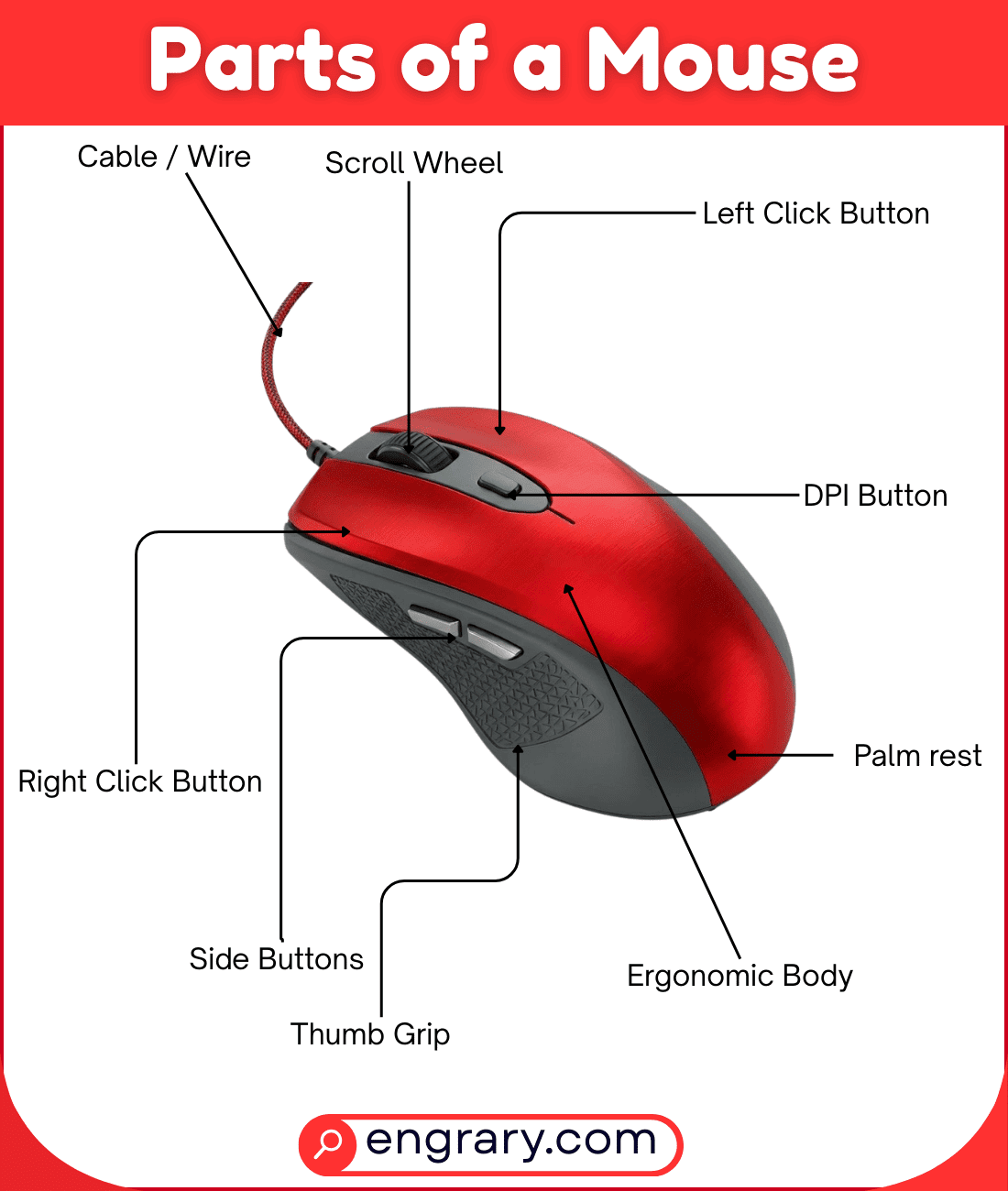
The diagram below shows the main visible parts of a mouse and how they are arranged across the top, sides, bottom, and inner section. It highlights key areas such as the shell, buttons, scroll wheel, side controls, sensor, and connection parts so readers can recognize each labeled part more easily.
Main Parts of a Mouse
Mouse Body
The mouse body is the full outer structure that holds the main control and hardware parts together. It gives the mouse its overall shape and supports the full layout.
Shell
The shell is the outer covering of the mouse body. It protects the inside parts and forms the visible shape of the mouse.
Upper Shell
The upper shell is the top outer section where the main click controls are placed. It forms the upper hand-contact area of the mouse.
Lower Shell
The lower shell is the bottom outer section under the mouse body. It supports the mouse from below and helps enclose the internal parts.
Top And Click Control Parts
Left Button
The left button is the main click control used for selecting, opening, and dragging items. It is one of the most frequently used parts of the mouse.
Right Button
The right button opens context actions or extra options in many programs. It works as the second main click control.
Scroll Wheel
The scroll wheel is the rolling control between the main buttons. It helps users move up and down through pages, lists, and screens.
Middle Button
The middle button is often built into the scroll wheel. It performs extra click actions in many programs and browsers.
DPI Button
The DPI button changes the mouse sensitivity on some models. It helps adjust how quickly the pointer moves on the screen.
Side And Grip Parts
Side Buttons
The side buttons are extra controls placed along the side of the mouse. They often help with quick commands such as forward and back actions.
Thumb Rest
The thumb rest is the shaped area where the thumb sits during use. It helps support hand position and improve comfort.
Grip Area
The grip area is the part of the mouse body shaped for the fingers and palm to hold. It helps the mouse feel stable during movement and clicking.
Bottom And Sensor Parts
Optical Sensor
The optical sensor is the tracking part on the bottom of the mouse. It detects movement across a surface and helps control pointer motion on the screen.
Sensor Lens
The sensor lens is the clear part over the sensor area on the bottom of the mouse. It helps the sensor detect surface movement more accurately.
LED Light
The LED light is the small light near the sensor area on many mice. It helps support tracking by lighting the surface below the mouse.
Mouse Feet
Mouse feet are the smooth pads on the underside of the mouse. They help the mouse glide more easily across a surface.
Battery Cover
The battery cover is the removable bottom panel found on some wireless mice. It protects the battery compartment and helps keep the battery in place.
Power Switch
The power switch turns a wireless mouse on or off. It helps control battery use and device operation.
Pairing Button
The pairing button helps a wireless mouse connect to a device. It is used when setting up or reconnecting the mouse.
Receiver Storage Slot
The receiver storage slot is the small space inside or under some wireless mice where the USB receiver can be stored. It helps keep the receiver in one place when not in use.
Connection And Internal Parts
USB Cable
The USB cable connects a wired mouse to a computer or other device. It carries power and movement signals between the mouse and the system.
USB Connector
The USB connector is the end part of the cable that plugs into a device. It creates the physical link needed for the mouse to work.
Wireless Receiver
The wireless receiver is the small device that links a wireless mouse to a computer. It receives signals from the mouse without a cable.
Charging Port
The charging port is the opening used to charge a rechargeable wireless mouse. It connects the mouse to a power source with a cable.
Battery
The battery stores electrical power for a wireless mouse. It allows the mouse to work without a direct wired connection.
Battery Compartment
The battery compartment is the space inside a wireless mouse that holds the battery. It helps keep the battery in position during use.
Switch
The switch is the internal part under a button that registers a press. It helps turn finger movement into a click command.
Scroll Wheel Encoder
The scroll wheel encoder is the internal part that detects the movement of the scroll wheel. It helps the mouse register scrolling actions.
PCB
The PCB, or printed circuit board, is the internal board that connects the electronic parts of the mouse. It helps the mouse send signals and process input.
Microprocessor
The microprocessor is the internal chip that helps manage the mouse’s electronic functions. It supports tracking, clicking, and signal handling.
Key Takeaways
A mouse works through connected outer and inner parts that each support clicking, tracking, grip, or connection. The body and shell hold the structure together, while the top controls handle clicking, scrolling, and pointer sensitivity. Meanwhile, the side parts improve hand support and quick access to extra commands, and the bottom parts help the mouse track movement smoothly. Finally, the connection and internal parts help the mouse link to a device, register input, and process movement and click signals.
FAQs
The main parts of a mouse include the body, buttons, scroll wheel, side controls, sensor, and connection parts. Some mice also include internal parts such as a battery, switch, PCB, and microprocessor.
The scroll wheel helps users move up and down through pages, documents, and lists. It may also work as a middle button when pressed.
The optical sensor is the tracking part on the bottom of the mouse. It detects movement across a surface and helps move the pointer on the screen.
The DPI button changes the mouse sensitivity on some models. It helps control how fast the pointer moves when the mouse is moved.
Wireless mice may include a battery, battery cover, and wireless receiver. These parts support power and connection without a cable.
The mouse body is the full outer structure, while the shell is the covering that forms and protects that structure. The shell is part of the full mouse body.
You May Also Like