A camera includes several connected parts that help capture, process, and store an image. The main groups usually include the camera body, lens, image sensor, viewfinder, shutter and aperture system, display and controls, power and storage parts, and connectivity parts. Each one has a clear role, so together they create a device that can frame a scene, control light, record an image, and save the result.
At the same time, these parts work as one system rather than as separate pieces. The lens gathers light, the shutter and aperture control how that light enters, the sensor records the image, and the processor helps turn that information into a usable photo or video file. Meanwhile, the viewfinder, screen, dials, buttons, battery, and memory card make the camera easier to operate in daily use.
Parts of a Camera With Labeled Diagram
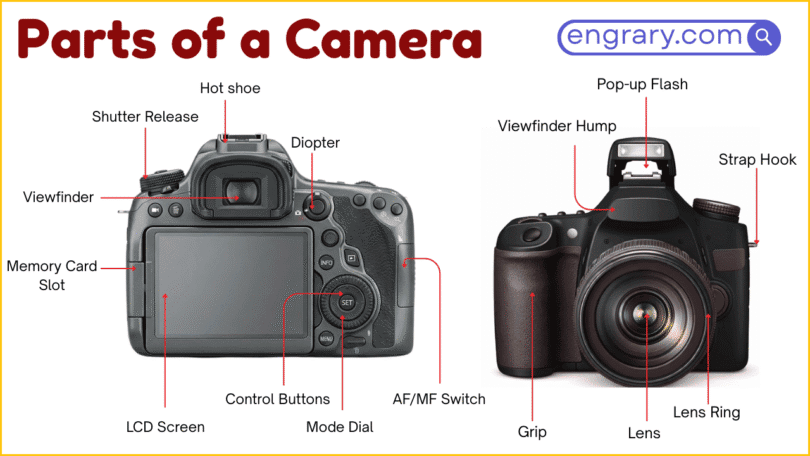
A labeled diagram of a camera usually points to the most visible body sections, control parts, lens parts, and image-making parts first. These names help readers identify the front, top, back, lens area, and internal image path before moving into smaller technical details.
Camera Body
The camera body is the main housing that holds the internal and external parts together. It supports the controls, sensor, screen, ports, and lens connection area.
Lens
The lens is the front optical part that gathers and directs light into the camera. It is one of the most important visible parts because it affects framing, focus, and image capture.
Image Sensor
The image sensor is the part that records the light coming through the lens. It is central to digital image-making because it turns the light information into image data.
Viewfinder
The viewfinder is the part used to look at the scene before taking a picture. Depending on the camera type, it may be optical or electronic.
Shutter and Aperture System
This system helps control how much light reaches the sensor and for how long. It is one of the key functional groups in photography.
Display and Controls
This group includes the screen, buttons, dials, and selectors used to operate the camera. These parts help the user frame images, adjust settings, and review results.
Power and Storage Parts
These parts keep the camera running and store the files it creates. They include the battery and memory card area.
Ports and Connectivity Parts
These are the connection points used for charging, data transfer, audio, and external accessories. They help the camera communicate with other devices.
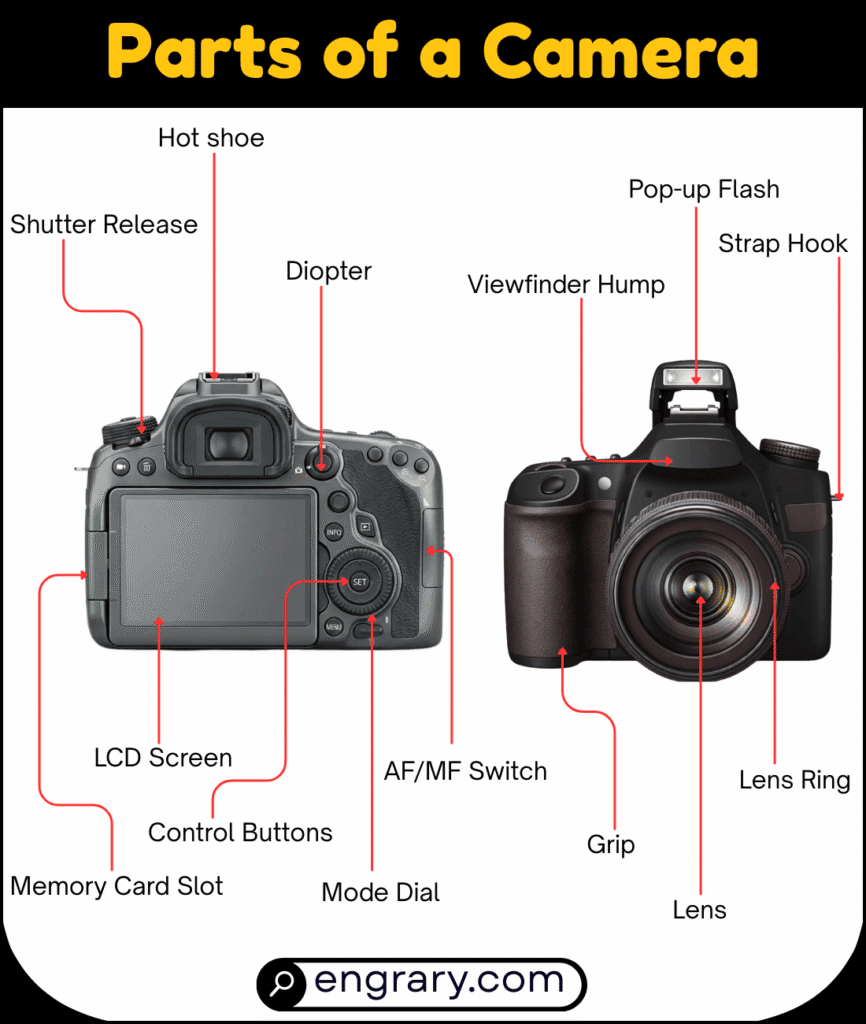
Main Parts of a Camera and Their Functions
The main parts of a camera can be grouped by what they do. Some gather light, some record the image, and others help the user control settings, store files, or connect accessories.
Camera Body
The camera body forms the main structure of the device. It supports the sensor, controls, ports, and mounting area for the lens.
Lens
The lens directs light into the camera. It helps determine focus, angle of view, and how the subject appears in the final image.
Image Sensor
The image sensor captures the light information that becomes the photo or video. It is one of the core internal parts of a digital camera.
Viewfinder
The viewfinder helps the user compose the scene before recording it. It gives a direct viewing point separate from or alongside the rear screen.
Shutter and Aperture System
These parts control exposure by managing light entry. Together, they help determine brightness and image-making conditions.
Display and Controls
These parts allow the user to change settings, navigate menus, and review images. They make the camera practical to operate in real shooting situations.
Power and Storage Parts
These parts support battery use and file storage. Without them, the camera could not run for long or save the images it captures.
Ports and Connectivity Parts
These parts support accessories, charging, data transfer, and external audio or display use. They extend what the camera can do beyond basic picture-taking.
Outer Body Parts of a Camera
The outer body parts form the visible shell and working shape of the camera. These parts help the user hold the camera, access controls, attach accessories, and identify the main body sections more easily.
Front of the Camera
The front is the side that faces the subject during shooting. It usually includes the lens mount area, flash, assist lights, and front controls.
Top of the Camera
The top section holds several of the most used shooting controls. It often includes the shutter button, mode dial, hot shoe, and power switch.
Back of the Camera
The back is the main control and viewing side for the user. It usually contains the screen, viewfinder, menu buttons, playback controls, and navigation selectors.
Side of the Camera
The side sections often contain doors or covers for ports, card slots, and connection points. They also help shape the grip and body design.
Bottom of the Camera
The bottom section supports mounting and battery access. It often includes the tripod mount and the battery compartment door.
Grip
The grip is the part shaped for holding the camera more securely. It helps the user keep the camera steady during shooting.
Hot Shoe
The hot shoe is the mounting point on top of the camera used for accessories such as an external flash. It helps connect and support added equipment.
Strap Lugs
Strap lugs are the side attachment points for the camera strap. They help the user carry the camera more safely and comfortably.
Front Parts of a Camera
The front parts of a camera include the mounting area, support lights, and several visible control points near the lens. These parts are important because they shape how the lens attaches and how the camera faces the subject.
Lens Mount
The lens mount is the circular connection point where the lens attaches to the camera body. It creates the link between the camera and the lens.
Lens Release Button
The lens release button allows the lens to be removed from the camera body. It is used when changing lenses.
Lens Mounting Mark
The lens mounting mark is the alignment point used when attaching a lens. It helps position the lens correctly during mounting.
Focus Assist Light
The focus assist light helps the camera focus in low-light conditions. It provides extra support when the scene is darker.
Built-In Flash
The built-in flash is the small light unit included in some cameras. It provides additional light for photography when needed.
Microphone
The microphone is the part that captures sound during video recording. It is usually placed near the front or top area of the body.
Front Control Dial
The front control dial is a turning control used to change settings such as shutter speed, aperture, or other functions. It gives faster access during shooting.
Self-Timer Lamp
The self-timer lamp lights up when the self-timer function is active. It helps show that the camera is counting down before taking a picture.
Top Parts of a Camera
The top parts of a camera include the main shooting controls that the user reaches most often while taking pictures. These parts help the camera respond quickly during shooting and make it easier to adjust settings without moving away from the viewfinder or screen.
Shutter Button
The shutter button is the main button used to take a picture. It is one of the most important controls on the camera because it starts the image capture process.
Power Switch
The power switch turns the camera on or off. It controls whether the camera is active and ready to use.
Mode Dial
The mode dial lets the user choose different shooting modes. It helps switch between automatic, manual, and other camera settings more easily.
Command Dial
The command dial is a rotating control used to adjust settings such as shutter speed, aperture, or exposure values. It allows quick changes while shooting.
Exposure Compensation Button
This button is used to make the image brighter or darker than the normal camera setting. It helps the user adjust exposure more directly.
ISO Button
The ISO button gives access to the light-sensitivity setting of the camera. It helps control how the camera responds in brighter or darker conditions.
Hot Shoe
The hot shoe is the accessory mount on top of the camera. It is commonly used for an external flash or other attachable equipment.
Built-In Flash Button
This button is used to raise or activate the built-in flash on cameras that include one. It helps control extra lighting when needed.
Back Parts of a Camera
The back parts of a camera include the main viewing and control area used during setup, shooting, and image review. These parts help the user compose the scene, move through settings, and manage focus or playback more easily.
Viewfinder
The viewfinder is the part used to look at the subject while composing an image. It gives the user a direct viewing point for framing the shot.
LCD Screen
The LCD screen shows the live view, menus, settings, and captured images. It is one of the main visual control parts on the back of the camera.
Live View Button
The live view button switches the camera into screen-based viewing mode. It allows the user to compose the image using the LCD screen.
Menu Button
The menu button opens the camera’s settings menu. It gives access to many setup and adjustment options.
Playback Button
The playback button shows images or videos that have already been recorded. It helps the user review captured files.
Delete Button
The delete button removes selected images or videos from the camera storage. It is used during playback or file review.
Focus Point Selector or Joystick
This control is used to move the active focus point around the frame. It helps the user choose where the camera should focus.
Multi-Selector
The multi-selector is the directional control used to move through menus, options, or image review screens. It helps with navigation inside the camera system.
AF-ON Button
The AF-ON button starts autofocus without pressing the shutter button halfway. It gives the user more direct control over focusing.
AE-L or AF-L Button
This button is used to lock exposure or focus, depending on the camera setup. It helps hold a chosen setting while the composition changes.
Lens Parts of a Camera
The lens parts of a camera control how light enters the camera and how the subject appears in the final image. These parts help with focus, zoom, protection, and attachment, so they play a major role in image quality and framing.
Front Lens Element
The front lens element is the outermost glass part at the front of the lens. It is the first surface that light passes through before moving deeper into the lens.
Filter Thread
The filter thread is the ring at the front of the lens used to attach filters. It allows extra accessories such as protective or effect filters to fit onto the lens.
Lens Hood Mount
The lens hood mount is the part used to attach a lens hood. It helps support the hood in front of the lens.
Zoom Ring
The zoom ring changes the focal length of a zoom lens. It helps the user make the subject appear closer or wider in the frame.
Focus Ring
The focus ring is the ring used to adjust focus manually. It helps control how sharp the subject appears.
Aperture Ring
The aperture ring is the ring used to adjust the aperture directly on some lenses. It changes how much light passes through the lens.
Lens Barrel
The lens barrel is the outer body of the lens. It holds the lens parts together and supports the rings and markings on the lens.
Lens Contacts
Lens contacts are the small metal connection points between the lens and the camera body. They help the lens and camera communicate electronically.
Rear Lens Element
The rear lens element is the glass part at the back of the lens nearest the camera body. It is the last lens surface light passes through before entering the camera.
Lens Cap
The lens cap covers the front of the lens when the camera is not in use. It helps protect the front lens element from dust, scratches, and marks.
Internal Image-Making Parts of a Camera
The internal image-making parts handle the main process of turning light into a photograph or video. These parts work together inside the camera, so the lens can direct light, the sensor can record it, and the camera can process the final image.
Image Sensor
The image sensor is the part that records the light entering the camera. It changes the light information into digital image data.
Shutter
The shutter controls how long light is allowed to reach the sensor. It is one of the main parts that affects exposure.
Aperture
The aperture is the opening that controls how much light passes through the lens. It helps manage brightness and also affects depth of field.
Mirror
The mirror is a moving internal part found in DSLR cameras. It directs light upward toward the viewfinder before the picture is taken.
Pentaprism or Pentamirror
This part is used in DSLR cameras to direct the image from the mirror to the optical viewfinder. It helps the user see through the lens more clearly.
Image Processor
The image processor handles the data captured by the sensor. It helps turn that information into a usable photo or video file.
Storage, Power, and Connection Parts
Storage, power, and connection parts help the camera run, save files, and communicate with other devices. While the lens and sensor handle image capture, these support parts make the camera practical for everyday use.
Memory Card Slot
The memory card slot holds the card used to store photos and videos. It is one of the main storage parts of the camera.
Battery Compartment
The battery compartment is the space where the camera battery is placed. It supplies the power needed for the camera to operate.
Battery Door
The battery door covers and protects the battery compartment. It helps keep the battery secure inside the camera body.
Tripod Mount
The tripod mount is the threaded point on the bottom of the camera used for attaching a tripod. It helps support stable shooting.
USB Port
The USB port is used for charging, data transfer, or connecting the camera to another device. It helps move files or power between the camera and external equipment.
HDMI Port
The HDMI port is the connection point used to send video or image output to an external screen. It helps the camera connect to larger displays or monitors.
Microphone Port
The microphone port allows an external microphone to connect to the camera. It helps improve audio recording during video use.
Headphone Port
The headphone port allows headphones to connect to the camera. It helps the user monitor recorded sound more directly.
Common Camera Parts by Camera Type
Camera parts can change slightly depending on the type of camera. Although many core parts stay similar, different camera designs place more importance on certain body parts, controls, or image-making systems.
DSLR Camera Parts
A DSLR camera usually includes a mirror, pentaprism or pentamirror, optical viewfinder, lens mount, control dials, and many external buttons. These parts work together to support through-the-lens viewing and image capture.
Mirrorless Camera Parts
A mirrorless camera includes the sensor, lens mount, electronic viewfinder or screen, dials, buttons, and storage parts, but it does not use the same mirror system found in DSLRs. Its design often keeps the body more compact.
Compact Camera Parts
A compact camera usually includes a built-in lens, screen, shutter button, smaller controls, battery compartment, and memory card slot. Its parts are arranged for simpler everyday use.
Bridge Camera Parts
A bridge camera usually combines a fixed lens with a DSLR-style body shape. It often includes a larger grip, top controls, screen, and viewfinder-like viewing option.
Action Camera Parts
An action camera usually includes a small body, fixed lens, wide-angle view, power button, recording controls, and storage or mounting parts. Its design focuses on portability and active use.
Key Takeaways
A camera works as one connected system in which the lens gathers light, the shutter and aperture control that light, the sensor and processor record and handle the image, and the body, controls, storage, and connection parts make the device practical to use. As these parts work together, the camera can frame a scene, adjust exposure, capture an image, store the file, and support playback or external connection.
FAQs
What are the main parts of a camera?
The main parts of a camera include the camera body, lens, image sensor, viewfinder, shutter and aperture system, display and controls, power and storage parts, and ports or connectivity parts.
What does the lens do in a camera?
The lens gathers and directs light into the camera. It helps control focus, framing, and how the subject appears in the final image.
What is the difference between a viewfinder and an LCD screen?
A viewfinder is used to look at the scene while composing a shot, while the LCD screen shows live view, menus, settings, and captured images.
Which parts of a camera control light?
The main light-control parts are the lens, aperture, and shutter. Together, they control how much light enters the camera and how long it reaches the sensor.
What parts of a camera store power and files?
The battery compartment stores the power source, and the memory card slot stores photos and videos. These parts help the camera run and save captured files.
You May Also Like