A computer is made up of several connected parts that help it take in information, process it, store it, and present the results to the user. Some parts are easy to see, such as the monitor, keyboard, and mouse, while others work inside the system unit, where they handle processing, memory, storage, power, and cooling. Together, these parts form one complete system.
First, input parts send commands and data into the computer. Next, internal parts such as the motherboard, CPU, RAM, and storage drive process and manage that information. Then, output parts show or play the results, while the power, cooling, and connectivity parts keep the system running smoothly and linked to other devices and networks.
Parts of a Computer With Pictures
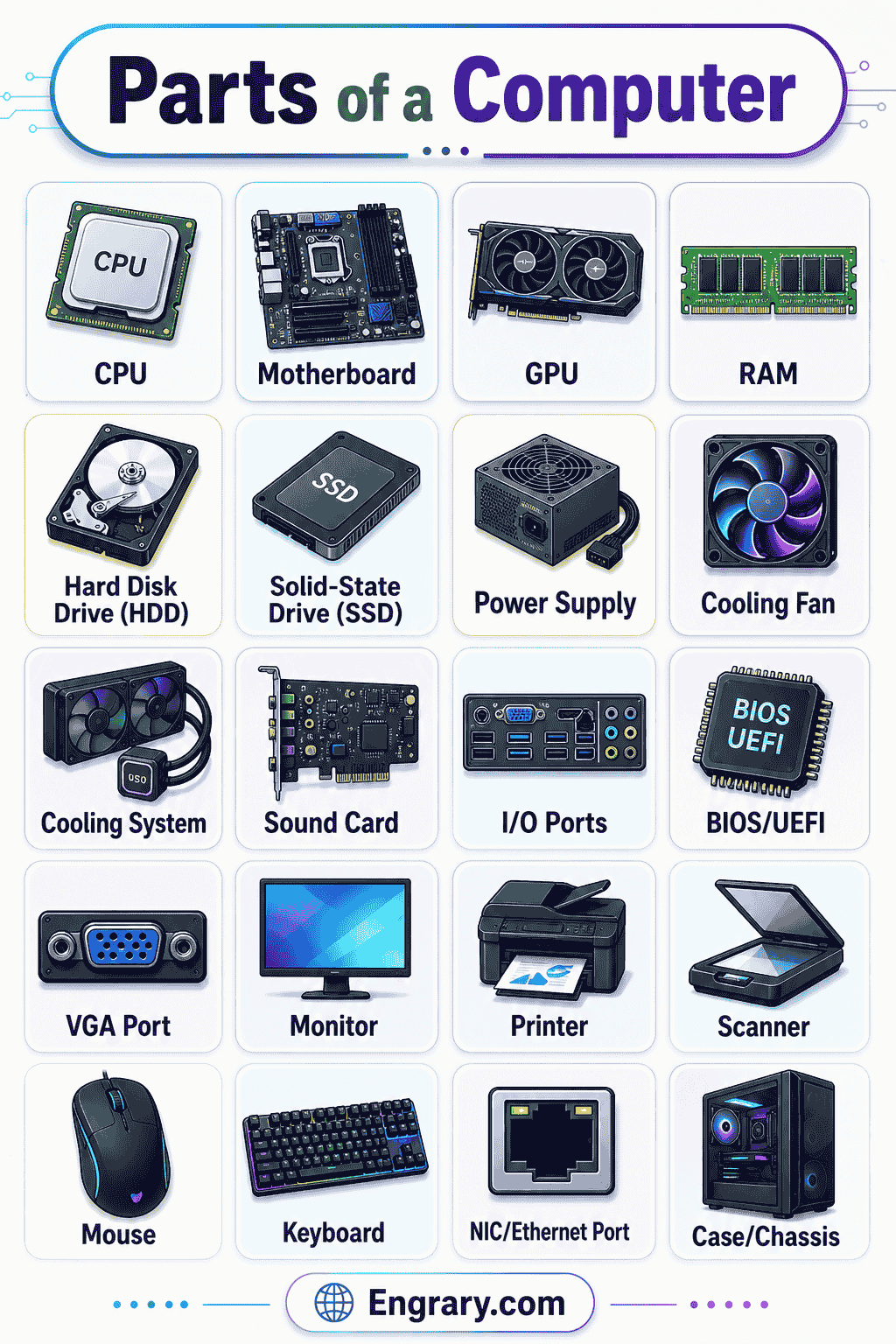
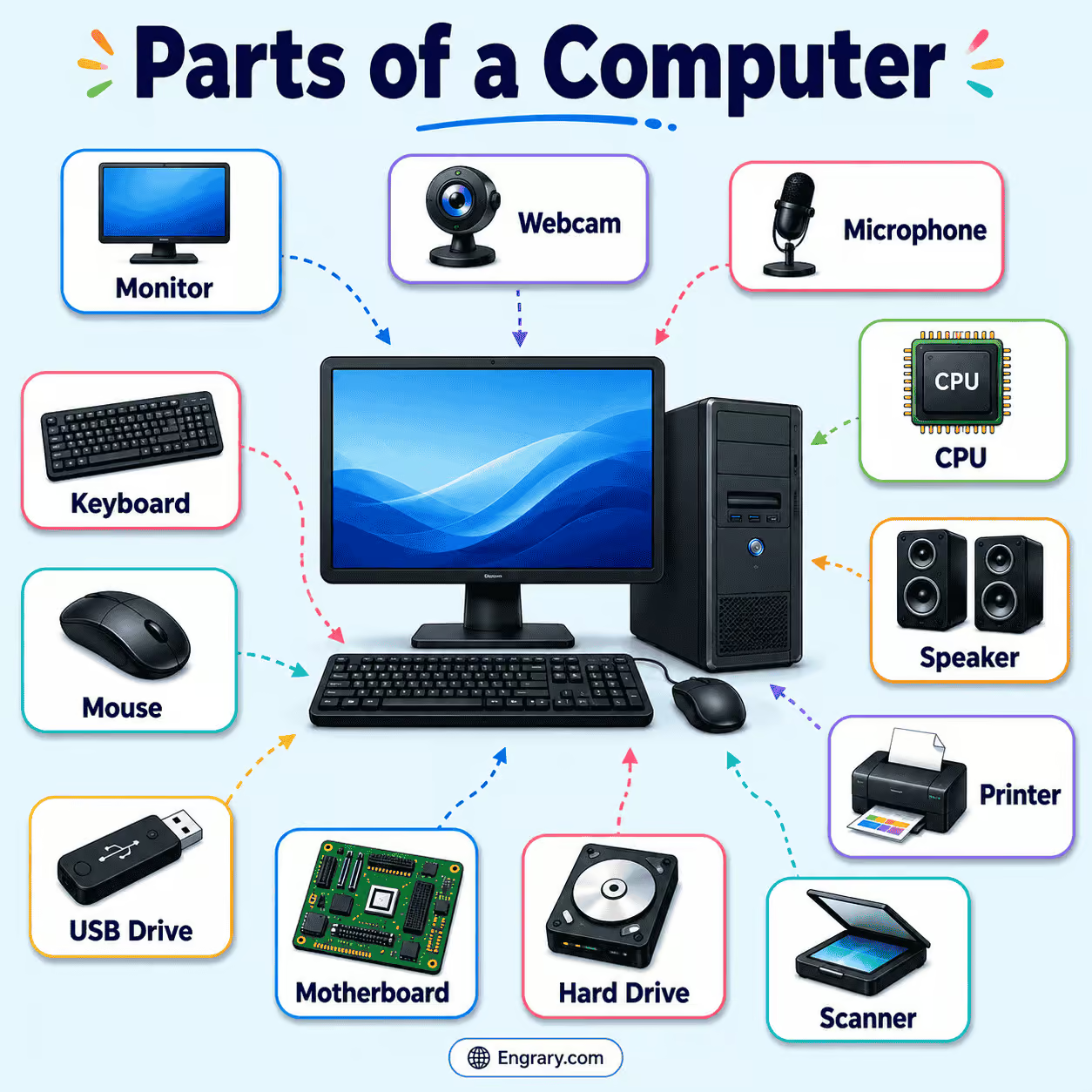
The labeled diagram below shows the main outer and inner parts of a computer and how they fit together around the system unit, display, input devices, and internal hardware. It highlights important parts such as the system unit, monitor, keyboard, mouse, motherboard, CPU, RAM, storage drive, power supply unit, and common ports so each part is easier to identify. It also helps show how the visible devices connect to the internal components that control processing, memory, storage, and output.
Main Parts of a Computer
The main parts of a computer are the basic components most users notice first. These parts include the central unit that holds the hardware and the main devices used to view information and control the system.
System Unit
The system unit is the main case that holds the internal hardware of the computer. Inside it are important parts such as the motherboard, CPU, RAM, storage drive, and power supply unit, so it acts as the core working section of the machine.
Monitor
The monitor is the screen that shows text, images, videos, menus, and other visual output. It lets the user see what the computer is doing and makes it easier to work with programs, files, and online content.
Keyboard
The keyboard is used to type letters, numbers, and commands into the computer. It remains one of the main ways users enter information and control software during everyday tasks.
Mouse
The mouse is a pointing device used to move the cursor, click items, drag objects, and open files or menus. It helps the user control what happens on the screen with speed and precision.
Input Parts of a Computer
Input parts are the devices that send data or instructions into the computer. They allow the user to type, point, speak, scan, or capture information so the system can process it.
Keyboard
The keyboard sends typed information and commands into the computer. It is used for writing, searching, entering data, and controlling many software functions.
Mouse
The mouse sends pointer movements and click actions into the computer. Because of this, it is one of the most common input devices used for navigation and selection.
Microphone
The microphone captures sound and sends audio input into the computer. It is used for voice recording, online calls, speech commands, and other audio-based tasks.
Webcam
The webcam captures images and video and sends that visual information into the computer. It is commonly used for video calls, recordings, online classes, and meetings.
Touchpad
The touchpad is a flat pointing surface commonly found on laptops. It allows the user to move the cursor, tap, scroll, and perform other pointer actions without a separate mouse.
Scanner
The scanner copies printed text or images into digital form. It helps move information from paper into the computer for saving, sharing, or editing.
Output Parts of a Computer
Output parts are the devices that present processed information to the user. They allow the computer to show, play, or print results after the internal parts complete their work.
Monitor
The monitor is the main visual output device of the computer. It displays the results of processing in a form the user can read or watch clearly.
Speakers
Speakers play sound produced by the computer. They allow the user to hear music, calls, alerts, videos, and other audio output.
Printer
The printer produces a physical copy of digital text or images on paper. It helps turn on-screen information into a printed form that can be read, shared, or stored.
Headphones
Headphones deliver sound directly to the user’s ears. They are useful for private listening during calls, study, music, videos, and other audio tasks.
Internal Parts of a Computer
The internal parts of a computer are the hardware components inside the system unit. These parts handle processing, memory, graphics, and power, so they form the central working system that keeps the computer operating.
Motherboard
The motherboard is the main circuit board inside the computer. It connects the CPU, RAM, storage devices, graphics hardware, and other internal parts, so it acts as the central hub of the system.
CPU
The CPU, or central processing unit, is the main processing part of the computer. It carries out instructions, performs calculations, and helps control many of the system’s operations.
RAM
RAM, or random access memory, is the short-term working memory of the computer. It temporarily holds data and instructions that the CPU needs to access quickly while programs are running.
ROM
ROM, or read-only memory, stores important startup instructions needed when the computer is turned on. Unlike RAM, it is used to keep essential system information available rather than hold temporary working data.
Graphics Card
The graphics card helps process and display images, video, and visual effects. It supports the monitor by handling graphics-related work more efficiently.
Power Supply Unit
The power supply unit, or PSU, converts electrical power from the outlet into the form needed by the computer’s internal parts. It sends power to the motherboard, storage devices, cooling parts, and other hardware.
Storage Parts of a Computer
Storage parts keep data, files, programs, and system information so they can be used later. Unlike working memory, storage is designed to hold information for a longer time, even when the computer is turned off.
Storage Drive
A storage drive is the main device used to save data inside a computer. It keeps the operating system, software, documents, images, and other files stored for future use.
Hard Disk Drive
A hard disk drive, or HDD, stores data on spinning magnetic disks. It is used for long-term storage and can hold large amounts of files and programs.
Solid State Drive
A solid state drive, or SSD, stores data on flash memory instead of spinning disks. Since it has no moving parts, it usually works faster and more quietly than a hard disk drive.
Optical Drive
An optical drive reads, and sometimes writes, data on optical discs such as CDs, DVDs, or Blu-ray discs. Although it is less common in many modern systems, it is still a recognized computer storage part.
USB Flash Drive
A USB flash drive is a small portable storage device that connects through a USB port. It is commonly used to move, save, and back up files between computers and other devices.
Power and Cooling Parts of a Computer
Power and cooling parts help the computer stay active, stable, and safe during use. While the power parts supply electricity to the system, the cooling parts help control heat so the internal hardware can continue working properly.
Power Supply Unit
The power supply unit sends usable electrical power to the computer’s internal hardware. Without it, the internal parts would not receive the energy needed to operate.
Heat Sink
A heat sink is a metal part that helps draw heat away from components such as the CPU. It spreads heat over a larger surface so cooling can happen more effectively.
Cooling Fan
A cooling fan moves air through the computer to reduce heat buildup. This helps keep important hardware at safer temperatures during operation.
Battery
A battery is a power source commonly found in laptops and some portable computers. It stores electrical energy so the computer can run without being plugged directly into a wall outlet.
Ports and Connectivity Parts of a Computer
Ports and connectivity parts allow a computer to connect with other devices, networks, and power sources. Some are physical connection points on the computer, while others help the system communicate wirelessly or through cables.
USB Port
A USB port is a common connection point used to attach devices such as flash drives, keyboards, mice, printers, and other accessories. It allows the computer to exchange data and, in some cases, supply power to connected devices.
HDMI Port
An HDMI port sends high-quality audio and video from the computer to another display device, such as a monitor, projector, or television. It is often used when connecting the computer to a larger external screen.
Audio Jack
The audio jack is used to connect sound devices such as headphones, speakers, or microphones. Depending on the port type, it can support audio input, output, or both.
Ethernet Port
The Ethernet port is used to connect the computer to a wired network through a network cable. It provides a stable connection for internet access and local network communication.
Power Port
The power port is the point where electrical power enters the computer. It allows the system to receive power from an external source or charger.
Wi-Fi Adapter
A Wi-Fi adapter allows the computer to connect to wireless networks. It helps the system send and receive data without needing a physical network cable.
Functions of Computer Parts
The parts of a computer work together in a connected sequence to receive input, process data, store information, and present the results to the user. While some parts help the computer take in commands, others handle processing, memory, storage, output, power, cooling, and connectivity.
| Part | Function |
|---|---|
| System Unit | Holds the main internal hardware of the computer and supports the system’s core operations. |
| Monitor | Displays text, images, videos, and other visual output. |
| Keyboard | Enters text, numbers, and commands into the computer. |
| Mouse | Moves the pointer and helps the user click, select, drag, and control items on the screen. |
| Motherboard | Connects the main internal parts and acts as the central hub of the computer. |
| CPU | Processes instructions, performs calculations, and controls system operations. |
| RAM | Temporarily holds data and instructions the CPU needs quickly. |
| ROM | Stores essential startup instructions used when the computer turns on. |
| Storage Drive | Saves files, programs, and system data for later use. |
| Hard Disk Drive | Stores large amounts of data for long-term use. |
| Solid State Drive | Stores data on flash memory for faster access. |
| Power Supply Unit | Supplies electrical power to the computer’s internal parts. |
| Graphics Card | Processes images, video, and visual effects for display. |
| Speakers | Play sound from the computer. |
| USB Port | Connects accessories and storage devices to the computer. |
Key Takeaways
The parts of a computer work together as one connected system, with input parts sending data into the machine, internal parts processing that data, storage parts saving it, output parts presenting the results, and power, cooling, and connectivity parts helping the system stay active and linked to other devices. As commands move from the keyboard, mouse, or other input devices to the CPU, RAM, and storage drive, the computer can process information, show it on the monitor or through speakers, and keep running smoothly with support from the power supply unit, cooling fan, and connection ports.
FAQs
The main parts of a computer include the system unit, monitor, keyboard, and mouse. Together, these parts help the user enter data, view results, and control the system more easily.
The CPU is the main processing part of the computer. It carries out instructions, performs calculations, and controls many of the system’s operations.
RAM is temporary working memory used while programs are running, while storage keeps files, software, and system data saved for later use, even when the computer is turned off.
Input parts, such as the keyboard and mouse, send data into the computer, while output parts, such as the monitor and speakers, present processed information to the user.
The motherboard is the main circuit board that connects important internal parts such as the CPU, RAM, storage devices, and other hardware. It acts as the central hub of the computer system.
You May Also Like