A mobile phone has many visible outer parts and internal parts that support display, touch input, calling, charging, storage, and connection. The main groups include the phone body, screen and front parts, side buttons, back camera area, ports, and internal parts, while smaller features such as the bezel, SIM tray, flash, speaker grille, and antenna help each section perform a more specific role.
First, it helps to see the phone as one connected device rather than a list of separate names. You’ll learn how each mobile phone part looks, what it is used for, and how to tell one from another, while also seeing how the front handles viewing and touch input, the side and back parts support control and image capture, and the internal hardware and ports work together to power the phone, run its functions, store data, and keep it connected.
Mobile Phone Parts Labeled Diagram
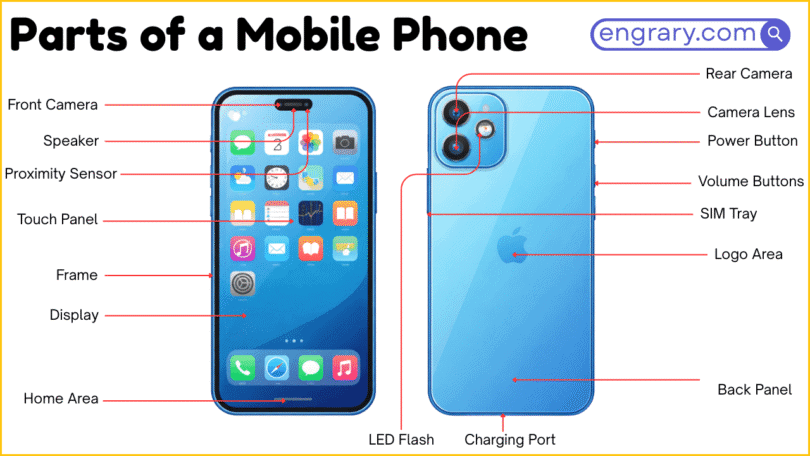
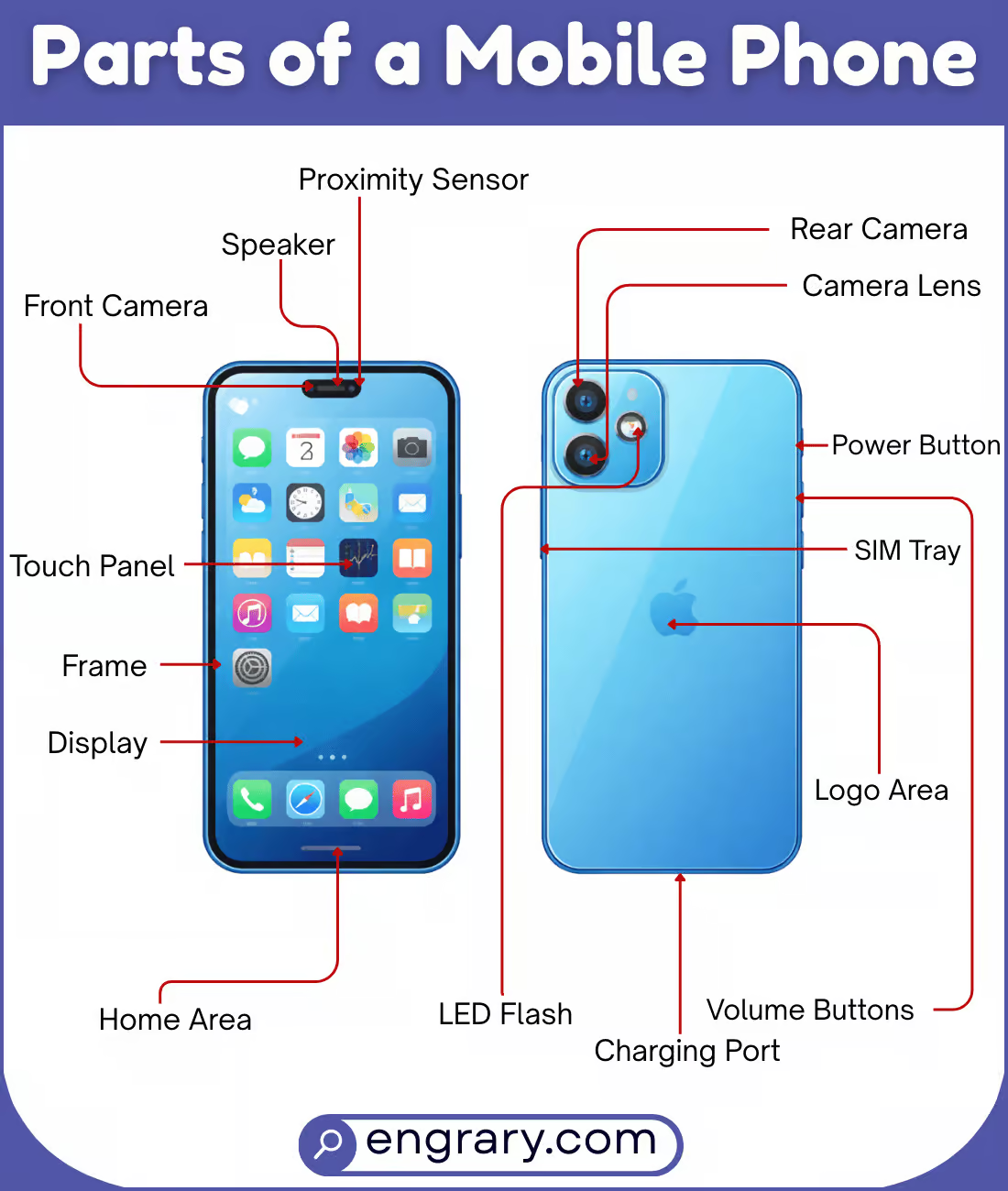
The diagram below shows the main visible parts of a mobile phone and how they are arranged across the front, sides, back, and bottom. It highlights key areas such as the display, buttons, cameras, ports, and body parts so readers can recognize each labeled part more easily.
Main Mobile Phone Body Parts
Mobile Phone Body
The mobile phone body is the full outer structure that holds all the visible and internal parts together. It gives the phone its overall shape and supports the main hardware.
Frame
The frame is the outer border that supports the phone from the sides. It helps hold the front and back sections together and adds structure to the device.
Side Frame
The side frame is the outer side edge that runs around the phone body. It supports the structure and holds the front and back sections together.
Front Panel
The front panel is the front-facing outer section that surrounds or supports the screen area. It forms the visible front surface of the phone.
Back Cover
The back cover is the rear outer section of the phone. It protects the inner parts from the back and forms the phone’s rear surface.
Rear Panel
The rear panel is the back-facing outer surface of the phone. It covers the rear side and forms the visible back area.
Bezel
The bezel is the border around the display area. It separates the screen from the outer edge of the phone body.
Screen And Front Parts
Display
The display is the main visual screen that shows text, images, icons, and videos. It is one of the most noticeable parts on the front of the phone.
Touchscreen
The touchscreen is the touch-sensitive layer that allows users to control the phone by tapping, swiping, or pressing the screen. It works together with the display during use.
Screen Glass
The screen glass is the outer protective layer over the display area. It helps protect the front surface during normal use.
Front Camera
The front camera is the small camera on the front of the phone. It is used for selfies, video calls, and front-facing photo capture.
Earpiece
The earpiece is the small speaker near the top front of the phone. It lets users hear sound clearly during calls.
Proximity Sensor
The proximity sensor detects when an object, such as the user’s face, is close to the phone. It helps the phone respond during certain actions, especially calling.
Ambient Light Sensor
The ambient light sensor detects the brightness around the phone. It helps the device adjust screen brightness to match the surrounding light.
Face Sensor Area
The face sensor area is the section on the front that holds sensors used for face-based features on some phones. It supports functions that depend on front-facing detection.
Status Light
The status light is the small visible light that shows alerts or charging activity on some phones. It helps signal phone status without needing the full screen.
Notch
The notch is the cut-out area at the top of the display on some phones. It creates space for front parts such as the camera or sensors.
Side And Button Parts
Power Button
The power button turns the phone screen on or off and may also help power the device on or off. It is one of the main side control buttons.
Volume Button
The volume button changes the sound level of the phone. It is usually placed on the side for quick control.
Mute Switch
The mute switch changes the phone between sound and silent modes on some models. It gives quick access to sound control without using the screen.
Action Button
The action button is a side control found on some phones that can trigger a selected function. It gives quick access to a specific task or setting.
SIM Tray
The SIM tray holds the SIM card and sometimes the memory card. It is usually found along the side edge of the phone.
Card Slot
The card slot is the opening area used for the SIM tray or memory card tray on some phones. It supports card placement and removal.
Back And Camera Parts
Rear Camera
The rear camera is the main camera on the back of the phone. It is used to take photos and record videos.
Camera Lens
The camera lens is the clear outer part that covers the camera opening. It helps focus light into the camera area.
Camera Module
The camera module is the full camera section on the back that contains one or more camera parts. It forms the raised or defined camera area on many phones.
Camera Bump
The camera bump is the raised area on the back where the camera section stands out from the phone body. It helps house the rear camera parts.
Flash
The flash is the small light placed near the rear camera. It helps brighten the scene when taking photos in lower light.
Rear Microphone
The rear microphone is the small microphone opening placed near the back camera area on some phones. It helps capture sound during video recording or other functions.
Fingerprint Sensor
The fingerprint sensor reads a user’s fingerprint for unlocking or secure access on some phones. It may be placed on the back or built into another part of the phone.
Port And Bottom Parts
Charging Port
The charging port is the opening used to charge the phone. It connects the phone to a power source with a cable.
USB Port
The USB port is the connector area used for charging or data transfer. It allows the phone to link with other devices through a cable.
Headphone Jack
The headphone jack is the round port used to connect wired earphones or headphones on some phones. It supports direct audio output.
Speaker Grille
The speaker grille is the opening or patterned section that lets sound come out from the phone’s speaker area. It is usually found along the bottom edge or lower body.
Primary Speaker
The primary speaker is the main speaker used for sound output from the lower part of the phone. It helps play audio, alerts, and speakerphone sound.
Secondary Speaker
The secondary speaker is the extra speaker used on some phones for added sound output. It can help create fuller audio during media playback.
Microphone Port
The microphone port is the small opening that allows the phone’s microphone to receive sound. It helps capture the user’s voice during calls and recordings.
Battery And Internal Parts
Battery
The battery stores electrical power for the phone. It allows the device to work without being connected to a charger all the time.
Charging Coil
The charging coil is the internal part used for wireless charging on some phones. It helps receive power without a cable.
Motherboard
The motherboard is the main internal board that connects many of the phone’s important parts. It helps the internal components work together.
Processor
The processor is the main chip that handles commands and operations inside the phone. It helps the device run apps, tasks, and system functions.
RAM
RAM is the working memory that helps the phone handle active tasks and apps. It supports smooth operation while the phone is in use.
Memory Chip
The memory chip stores data used by the phone during operation. It helps support app use, system tasks, and saved information.
Storage Chip
The storage chip holds saved files, apps, and system data inside the phone. It keeps information stored even when the phone is turned off.
Antenna
The antenna helps the phone send and receive signals. It supports connection for calling, mobile data, and wireless functions.
SIM Card
The SIM card stores network-related information that connects the phone to a mobile carrier. It helps the device access calling and data services.
Memory Card
The memory card is a removable storage card used in some phones. It adds extra space for files, photos, videos, and apps.
Vibrator Motor
The vibrator motor creates the phone’s vibration alerts. It helps the phone signal calls, messages, or notifications without sound.
Speaker Module
The speaker module is the internal sound unit that produces audio inside the phone. It supports sound output for media, alerts, and calls.
Key Takeaways
A mobile phone works through connected outer and inner parts that each support display, control, sound, connection, or power. The body, frame, and panels hold the device together, while the front parts handle viewing, touch input, and calling. Meanwhile, the side buttons and back camera parts support control and image capture, and the ports help with charging, audio, and connection. Finally, the battery and internal parts power the phone and help its main hardware process signals, store data, and run everyday functions.
FAQs
The main parts of a mobile phone include the body, screen, buttons, camera parts, ports, battery, and internal hardware. Each section supports display, control, connection, or power.
The display is the screen that shows text, images, icons, and videos. It is the main visual part of the phone’s front side.
The display shows visual content, while the touchscreen detects finger input. These two parts work together during normal phone use.
The SIM tray holds the SIM card and sometimes a memory card. It helps connect the phone to mobile network services.
The charging port is the part used to connect the phone to a power source. It allows the battery to charge through a cable.
The internal parts of a mobile phone include the battery, motherboard, processor, memory chip, antenna, SIM card, memory card, and vibrator motor. These parts help the phone run, store data, connect, and send alerts.
You May Also Like