A television has several visible outer parts and internal sections that support picture display, sound, control, connection, and support. The main groups include the TV body, screen and front parts, side and back parts, control and connection parts, and internal and support parts, while smaller features such as the bezel, remote sensor, HDMI port, backlight, and wall mount area help each section perform a more specific role.
First, it helps to see the television as one connected device rather than a list of separate names. You’ll learn how each television part looks, what it is used for, and how to tell one from another, while also seeing how the screen and front parts produce the picture, the ports and buttons manage input and control, and the internal and support parts work together to power the TV, process signals, play sound, and hold it in place during use.
Television Parts Labeled Diagram
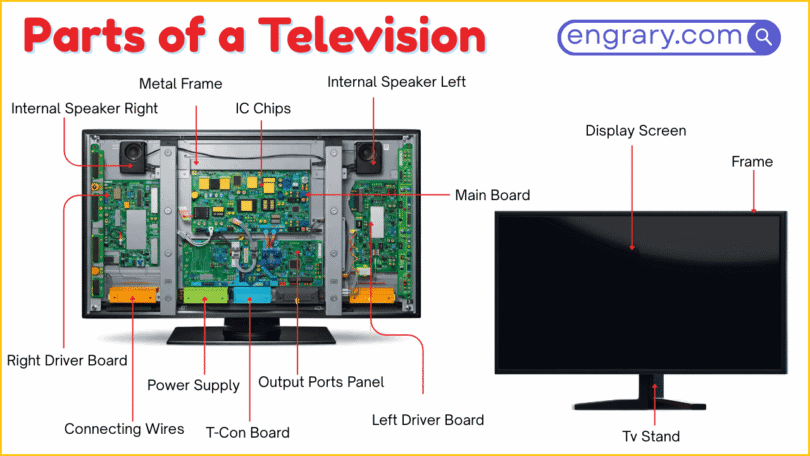
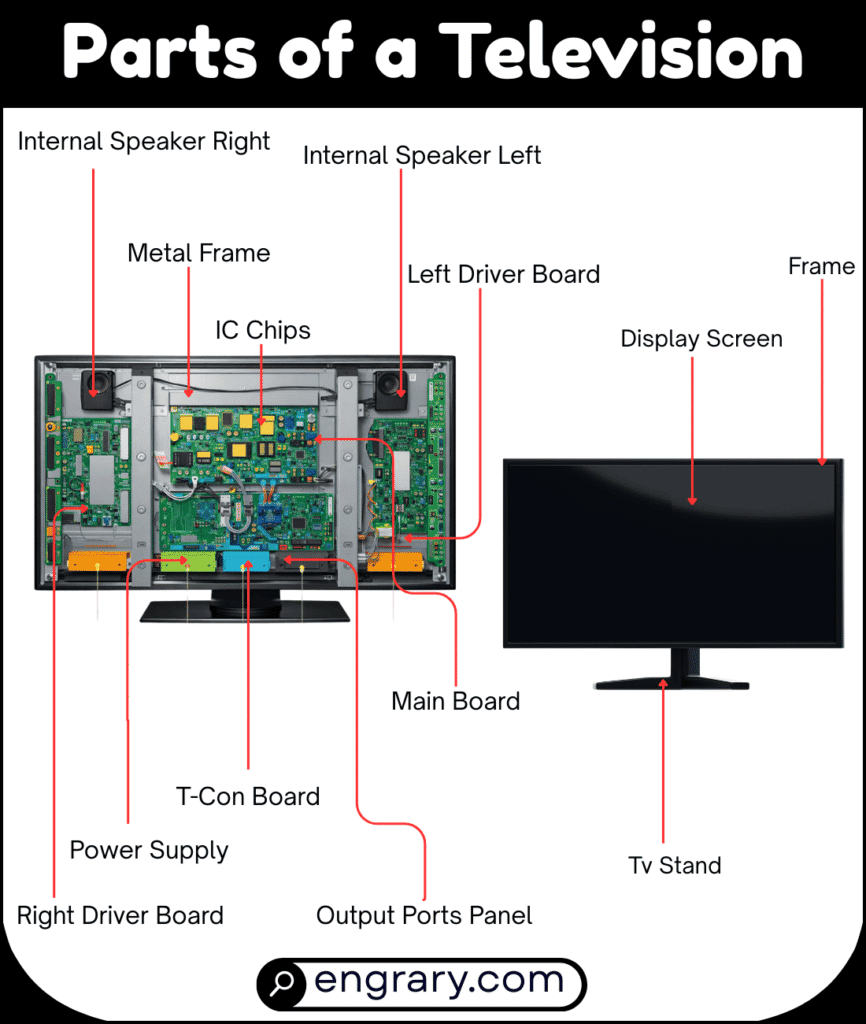
The diagram below shows the main visible parts of a television and how they are arranged across the front, sides, back, and support area. It highlights key areas such as the screen, body frame, ports, controls, and support parts so readers can recognize each labeled part more easily.
Main Television Body Parts
TV Body
The TV body is the full outer structure that holds all the visible and internal parts together. It gives the television its overall shape and supports the screen, rear panel, and hardware inside.
Frame
The frame is the outer structural border that supports the television body. It helps hold the front and back sections together and adds strength to the set.
Bezel
The bezel is the border around the screen. It separates the display area from the outer edge of the television.
Back Panel
The back panel is the large rear outer section of the television. It covers the back side and protects the internal parts inside the set.
Logo Area
The logo area is the section on the front or lower edge where the brand mark is placed. It helps identify the television model or maker visually.
Screen And Front Parts
Front Panel
The front panel is the front-facing outer section of the television that surrounds and supports the screen area. It forms the visible front surface of the TV.
Screen
The screen is the main front surface where images and video appear. It is the most noticeable part of the television.
Display Panel
The display panel is the part inside the screen area that produces the visible picture. It helps form the images, colors, and motion seen on the television.
Remote Sensor
The remote sensor receives signals sent from the remote control. It allows the television to respond to commands such as power, volume, and channel changes.
Power Indicator Light
The power indicator light is the small light on the front of the television that shows power or standby status. It helps users know whether the set is on, off, or waiting.
Speaker Area
The speaker area is the front section where sound comes out on some televisions. It helps project audio from the set during viewing.
Side And Back Parts
Side Panel
The side panel is the outer section along the side edge of the television. It helps form the TV’s outer shape and may also hold side-facing ports or controls on some models.
Rear Panel
The rear panel is the back-facing section of the television where many connection points are placed. It helps cover the internal hardware and provides access to rear ports.
Port Panel
The port panel is the section on the side or back of the television where connection ports are grouped. It helps organize the input and output connections in one area.
Ventilation Holes
Ventilation holes are the openings on the back or sides of the television that help release heat. They support airflow and help the TV stay cooler during use.
Control And Connection Parts
Power Button
The power button turns the television on or off. It is one of the main physical controls on the set.
Volume Button
The volume button raises or lowers the sound level. It helps users control audio directly from the television when needed.
Input Button
The input button changes the active source on the television. It helps switch between devices such as cable boxes, game consoles, or streaming devices.
HDMI Port
The HDMI port is the connection point used for high-quality video and audio from external devices. It connects the television to devices such as media players, consoles, and receivers.
ARC/eARC HDMI Port
The ARC or eARC HDMI port is the HDMI connection used to send audio between the television and a compatible sound device. It supports audio return through the HDMI link.
USB Port
The USB port allows the television to connect to compatible storage devices or accessories. It may be used for media playback, service tasks, or power support.
Ethernet Port
The Ethernet port is the wired network connection on the television. It allows the TV to connect to the internet or a local network through a cable.
Antenna/Cable Port
The antenna or cable port is the round connection point used for broadcast or cable TV signals. It allows the television to receive channel input from an external signal source.
Optical Audio Port
The optical audio port sends audio from the television to another sound device using a digital signal. It is often used to connect the TV to speakers or sound systems.
Headphone Jack
The headphone jack is the port used to connect wired headphones or external audio equipment on some televisions. It allows direct audio output from the TV.
Power Port
The power port is the point where the television receives electrical power. It connects the TV to its power cable or power source.
Internal And Support Parts
Speaker
The speaker is the internal sound-producing part of the television. It helps the TV play audio during shows, movies, and other media.
Main Board
The main board is the central internal circuit board that manages many of the television’s functions. It helps the TV process signals and control its major hardware.
Wi-Fi Module
The Wi-Fi module is the internal part that helps the television connect to wireless networks. It supports internet-based features without a wired network cable.
Power Supply
The power supply is the internal part that manages electrical power inside the television. It helps deliver the right amount of power to the TV’s working parts.
Backlight
The backlight is the light source behind the display panel in many televisions. It helps make the picture visible on the screen.
T-Con Board
The T-Con board is the internal part that helps control how image data reaches the display panel. It supports picture timing and screen output.
Stand
The stand is the support structure that holds the television upright on a flat surface. It helps keep the TV balanced during use.
Base
The base is the lower support part attached to the stand. It helps the television rest securely on a table or other surface.
Wall Mount Area
The wall mount area is the section on the back of the television where a mounting bracket attaches. It allows the TV to be fixed to a wall instead of placed on a stand.
VESA Mount Holes
The VESA mount holes are the standardized mounting points on the back of the television. They allow a wall bracket to attach to the TV securely.
Key Takeaways
A television works through connected outer, display, control, connection, and support parts that each handle a specific role. The body, frame, and panels hold the set together, while the screen and display panel produce the visible picture. Meanwhile, the buttons and ports help users control the TV and connect outside devices, and the internal parts manage sound, power, and image processing. Finally, the stand, base, and wall mount area support how the television is placed and used in different spaces.
FAQs
The main parts of a television include the body, screen, front and rear sections, control buttons, connection ports, internal hardware, and support parts. Each section helps the TV display images, play sound, or connect to other devices.
The bezel is the border around the screen. It separates the display area from the outer body and helps frame the front of the television.
The display panel is the part inside the screen area that produces the picture. It helps form the colors, images, and motion seen during viewing.
A television can have ports such as HDMI, USB, Ethernet, antenna or cable, optical audio, and power ports. These help with video input, sound output, internet access, and power connection.
The backlight is the light source behind the display panel in many TVs. It helps make the screen image visible.
The wall mount area is the section on the back of the television where a mounting bracket attaches. It allows the TV to be placed on a wall instead of on a stand.
You May Also Like