A printer has many visible outer parts and internal parts that support paper feeding, printing, scanning, control, and connection. The main groups include the printer body, paper input and output parts, printing parts, control and display parts, and connection and internal parts, while smaller parts such as the roller, drum unit, scanner glass, and main board help each section perform a more specific role.
First, it helps to see the printer as one connected machine rather than a list of separate names. You’ll learn how each printer part looks, what it is used for, and how to tell one from another, while also seeing how the trays and feeder parts move paper, the print hardware forms text and images, and the control, scanner, and internal parts work together to help the printer receive commands, process paper, and complete each task.
Printer Parts Labeled Diagram
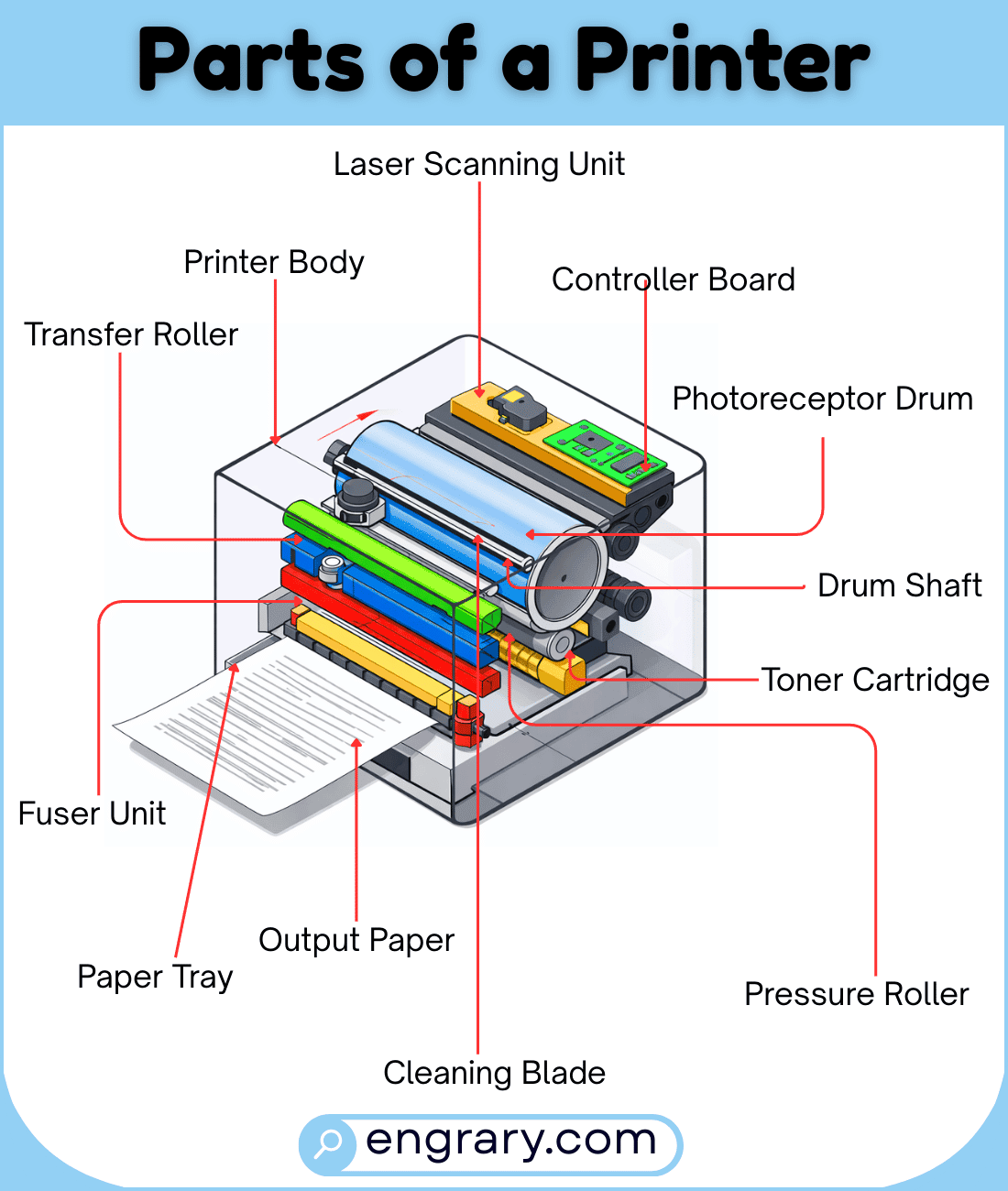
The diagram below shows the main visible parts of a printer and how they are arranged across the outer body, paper path, control area, and rear section. It highlights key areas such as the trays, covers, print hardware, scanner parts, and ports so readers can recognize each labeled part more easily.
Main Printer Body Parts
Printer Body
The printer body is the full outer structure that holds the printer’s main parts together. It gives the machine its shape and supports the paper path, print hardware, and control area.
Top Cover
The top cover is the upper outer panel of the printer. It protects the inside parts and gives access to certain internal sections on some models.
Document Cover
The document cover is the top lid that closes over the scanner glass on all-in-one printers. It helps protect the glass and holds documents flat during scanning or copying.
Front Cover
The front cover is the outer panel on the front side of the printer. It often opens to give access to internal print parts or paper areas.
Front Door
The front door is the access panel on the front of the printer that opens for maintenance or part access. It helps users reach items such as cartridges or internal paper-path sections.
Rear Cover
The rear cover is the outer panel on the back of the printer. It helps protect rear components and may open on some models for access.
Rear Door
The rear door is the back access panel that opens to reach internal printer parts or clear paper from the rear path. It supports access to the paper route and internal hardware.
Casing
The casing is the hard outer shell that surrounds and protects the main printer parts. It supports the printer’s structure and helps keep the inside components enclosed.
Paper Input And Output Parts
Input Tray
The input tray is the section where paper is placed before printing. It holds the sheets in position so the printer can feed them one by one.
Tray 1
Tray 1 is the main paper tray on many printers. It usually serves as the primary paper source for regular printing.
Output Tray
The output tray is the area where printed pages collect after they leave the printer. It helps keep finished sheets stacked in one place.
Paper Feeder
The paper feeder is the part that helps move paper from the tray into the printer. It starts the paper’s path through the machine.
Document Feeder Tray
The document feeder tray is the section where papers are placed for automatic scanning or copying on some printers. It helps feed multiple pages through the scanner area.
Paper Guide
The paper guide helps keep the paper aligned as it enters the printer. It supports smooth feeding and helps prevent the paper from shifting out of place.
Document Guides
The document guides are the adjustable side pieces in the feeder area that hold papers straight. They help keep documents aligned during scanning or copying.
Roller
The roller is the part that grips and moves paper through the printer. It plays a major role in paper feeding and movement.
Bypass Tray
The bypass tray is the manual paper slot or tray used for special paper types or extra sheets. It gives the printer another paper entry point.
Output Tray Extension
The output tray extension is the extra support piece that extends from the output area on some printers. It helps hold printed pages as they come out.
Document Feeder Output Tray
The document feeder output tray is the area where scanned or copied pages exit after passing through the feeder. It helps collect finished documents neatly.
Printing And Ink Parts
Print Head
The print head is the part that places ink onto the paper in an inkjet printer. It moves across the page and helps form text and images.
Ink Cartridge
The ink cartridge holds the liquid ink used for printing. It supplies the print head with the ink needed to create words and pictures.
Toner Cartridge
The toner cartridge holds the fine powder used in a laser printer. It provides the material that forms the printed image on the page.
Drum Unit
The drum unit is the part that helps transfer the printed image onto the paper in many laser printers. It works with the toner during the printing process.
Imaging Unit
The imaging unit is the section that helps build and transfer the image inside certain printers. It supports the printing process by preparing the image before it reaches the paper.
Fuser
The fuser is the part in a laser printer that uses heat and pressure to fix toner onto the paper. It helps make the printed text and images stay in place.
Transfer Belt
The transfer belt moves the image through part of the printing path in some printers. It helps transfer the printed image from one section to another.
Carriage
The carriage is the moving part that holds and positions the ink cartridge or print head in some printers. It helps the printing parts travel across the page.
Motor Assembly
The motor assembly powers the movement of certain internal printer parts. It helps drive the paper path and printing actions inside the machine.
Control And Display Parts
Control Panel
The control panel is the section with buttons or touch controls used to operate the printer. It helps users manage printing, copying, scanning, and settings.
User Interface
The user interface is the part of the printer that lets users interact with its controls and options. It includes the main control area used for commands and settings.
Display Screen
The display screen shows printer information, menus, settings, and status messages. It helps users check and control what the printer is doing.
Power Button
The power button turns the printer on or off. It is one of the main control parts on the machine.
Power/Wake Button
The power/wake button turns the printer on or brings it out of sleep mode on some models. It gives quick control over printer activity.
Scanner Lid
The scanner lid is the top cover that lifts to access the scanner glass. It helps protect the scanning area when the printer is not in use.
Scanner Glass
The scanner glass is the flat transparent surface where a document is placed for scanning or copying. It supports clear image capture from the page.
Document Glass
The document glass is the glass surface used to scan or copy a page placed under the lid. It forms the main scanning surface in many printers.
Connection And Internal Parts
USB Port
The USB port is the connection point used to link the printer to a computer or another device with a cable. It supports data transfer for printing tasks.
USB Type-B Port
The USB Type-B port is the square-shaped USB connection commonly found on many printers. It is used to connect the printer to a computer.
USB Type-A Port
The USB Type-A port is the flat rectangular USB connection found on some printers. It may be used for direct media access or other connected functions.
Ethernet Port
The Ethernet port is the wired network connection point on the printer. It allows the printer to connect to a local network with a cable.
Power Port
The power port is the connection point where the printer receives electrical power. It links the printer to its power source.
Main Power Outlet
The main power outlet is the point where the power cable connects to the printer. It supplies the machine with the electricity needed to operate.
Power Supply
The power supply is the internal part that manages electrical power for the printer. It helps deliver power to the printer’s working parts.
Main Power Switch
The main power switch controls the printer’s main power state on some models. It allows the printer to be turned on or off at the hardware level.
Main Board
The main board is the internal circuit board that connects and manages many of the printer’s key functions. It helps the machine process commands and coordinate its parts.
Key Takeaways
A printer works through connected outer, paper-handling, printing, control, and internal parts that each support a specific task. The body and covers hold the machine together, while the trays, feeder parts, and rollers guide paper through the printer. Meanwhile, the print head, cartridges, drum, and fuser handle image transfer, and the control panel and scanner parts help users manage printing and copying. Finally, the ports, power parts, and main board help the printer connect, receive power, and run its internal functions.
FAQs
The main parts of a printer include the body, paper trays, feeder parts, print hardware, control area, scanner parts, ports, and internal components. Each section helps the printer feed paper, print, or connect and operate.
The paper tray holds the sheets before printing begins. It keeps the paper in place so the printer can feed it into the machine.
An ink cartridge holds liquid ink used in inkjet printers, while a toner cartridge holds fine powder used in laser printers. Both supply the material needed for printing.
The fuser uses heat and pressure to fix toner onto the paper in a laser printer. It helps the printed image stay attached to the page.
The scanner glass is the flat glass surface used to scan or copy a document. It sits under the scanner lid on many printers.
A printer can have ports such as a USB port, USB Type-B port, USB Type-A port, Ethernet port, and power port. These help with connection, data transfer, and power.
You May Also Like