
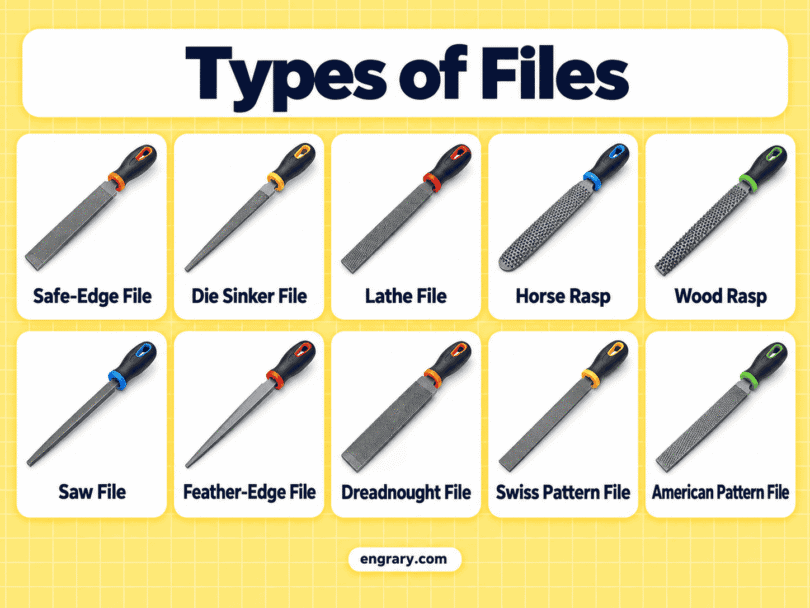
Files are hand tools with hardened cutting teeth that remove small amounts of material from a surface. Although many look similar at first, their cross-section, taper, curvature, tooth arrangement, and safe edges can make them suitable for very different kinds of shaping and finishing work.
In this guide, you’ll learn 32 types of files with pictures and uses, from familiar Flat, Round, and Half-Round Files to precision Swiss profiles, miniature files, rasps, and job-specific designs. The descriptions focus on simple visual clues that make each file easier to identify.
File Types by Shape and Cross-Section
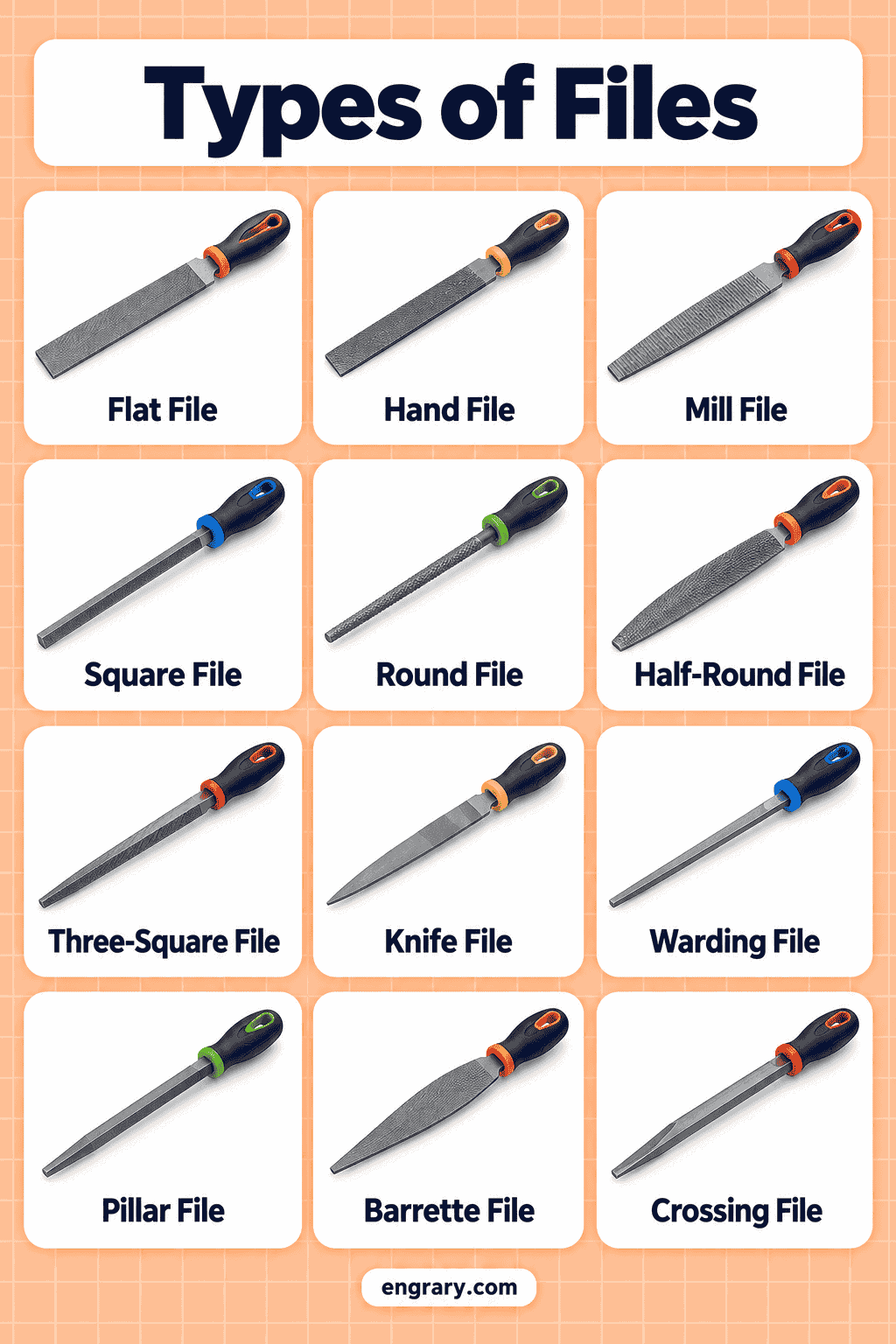
The quickest way to identify a file is to look at its cross-section. A file may be flat, round, square, triangular, wedge-shaped, curved, or extremely thin, and that shape determines which surfaces it can reach.
1. Flat File
A Flat File has a rectangular cross-section with broad, flat working faces. Many models taper slightly toward the tip, making this one of the most familiar general file shapes.
2. Hand File
A Hand File has a rectangular body with relatively parallel sides. Traditional versions often have one safe edge without cutting teeth, which helps distinguish them from ordinary Flat Files.
3. Mill File
A Mill File is a relatively slim rectangular file that commonly has single-cut teeth. Its narrow body and gradual taper give it a lighter appearance than many heavy general-purpose files.
4. Half-Round File
A Half-Round File has one flat face and one convex face. This combination makes the cross-section easy to recognize even when the file is viewed from the end.
5. Round File
A Round File has a circular cross-section along its working body. Depending on the design, the diameter may remain fairly consistent or gradually decrease toward the tip.
6. Rat-Tail File
A Rat-Tail File is a strongly tapered round file. Its narrowing circular body separates it from a more uniformly shaped Round File.
7. Square File
A Square File has four flat working faces arranged around a square cross-section. Its corners form sharp right angles that make the profile immediately recognizable.
8. Three-Square File
A Three-Square File has a triangular cross-section with three filing faces. It is also commonly described as a Triangular File.
9. Knife File
A Knife File has a wedge-shaped cross-section that narrows toward a thin edge. Its thick back and blade-like edge resemble the profile of a knife.
10. Warding File
A Warding File has a thin, narrow rectangular body. It looks noticeably slimmer than a conventional Flat or Hand File.
11. Taper File
A Taper File normally has a triangular cross-section that gradually narrows toward the point. Regular, slim, and extra-slim versions belong to the same general taper-file family.
12. Pillar File
A Pillar File has a narrow rectangular cross-section with relatively parallel sides. Its proportions are more slender than a broad Flat File while remaining thicker than many very fine slot files.
13. Riffler File
A Riffler File has one or two narrow shaped working ends connected by a central body. The curved or angled ends give it a distinctive sculpting and precision-file appearance.
14. Curved-Tooth File
A Curved-Tooth File has rows of teeth that sweep across the face in curved lines rather than conventional straight rows. The unusual tooth pattern is often visible at a glance.
15. Chainsaw File
A Chainsaw File is a slender round file made in controlled diameters. Its long cylindrical body resembles a Round File but is strongly associated with chainsaw-chain maintenance.
16. Wood Rasp
A Wood Rasp has individually raised teeth rather than the regular rows found on a conventional file. Its surface therefore looks much rougher and more textured.
17. Cabinet Rasp
A Cabinet Rasp uses raised rasp teeth in a more refined shaping tool. It often has a carefully formed flat or curved body and a finer appearance than a coarse general Wood Rasp.
18. Thread Restoring File
A Thread Restoring File has repeated tooth profiles along its edges or faces that correspond to different thread pitches. Its multi-edge design makes it visually different from an ordinary flat workshop file.
Flat and Rectangular Files
Several precision files retain a broadly flat body but change the thickness, edge treatment, or tooth arrangement. These differences matter because two rectangular files can look similar from the face while having completely different edge profiles.
19. Equaling File
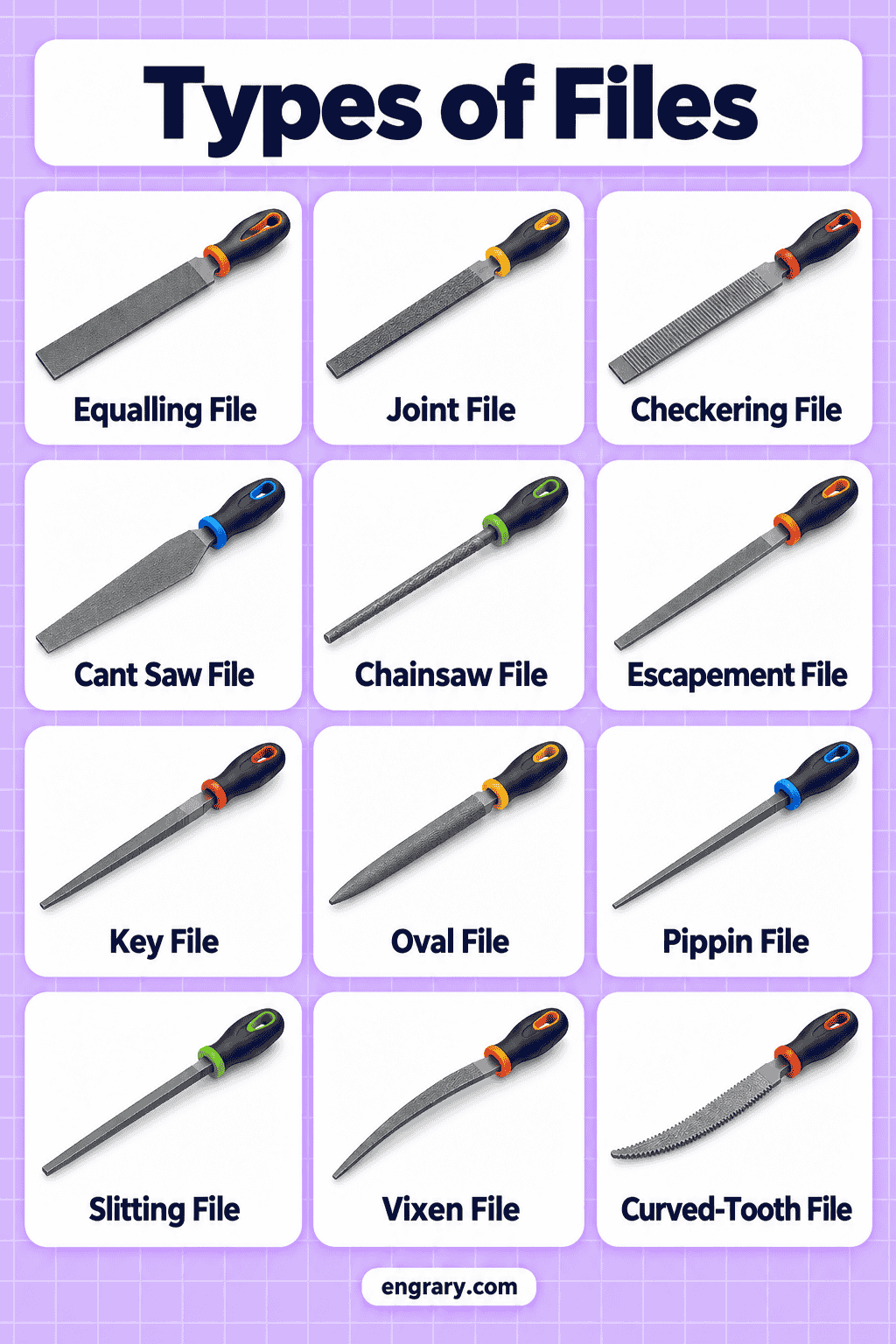
An Equaling File has a thin, flat rectangular cross-section with narrow edges. Its slim body is associated with precise work where a conventional Flat File would appear too bulky.
20. Slitting File
A Slitting File has an extremely thin, blade-like rectangular body. Unlike a Knife File, which forms a wedge, the Slitting File remains much flatter across its section.
21. Checkering File
A Checkering File has parallel rows of accurately spaced cutting teeth across its working faces. The regular lined tooth pattern is its most distinctive visual feature.
Round, Curved, and Combination Files
Not every curved file is simply round. Some combine two curved faces, while others use oval or mixed profiles that create very different cross-sections.
22. Crossing File
A Crossing File has two convex faces with different curves or radii. Viewed from the end, it resembles a curved lens rather than a Half-Round File with one flat side.
23. Oval File
An Oval File has a fully curved oval cross-section. It is flatter than a Round File but has no flat face like a Half-Round File.
24. Pippin File
A Pippin File has a distinctive tapered, teardrop-like or lens-shaped cross-section combining different curves and edges. Its asymmetric precision profile makes it easy to distinguish from ordinary Oval Files.
25. Round-Edge Joint File
A Round-Edge Joint File has broad flat faces combined with a rounded working edge. The mixture of flat surfaces and a curved edge creates its defining profile.
Thin and Tapered Files
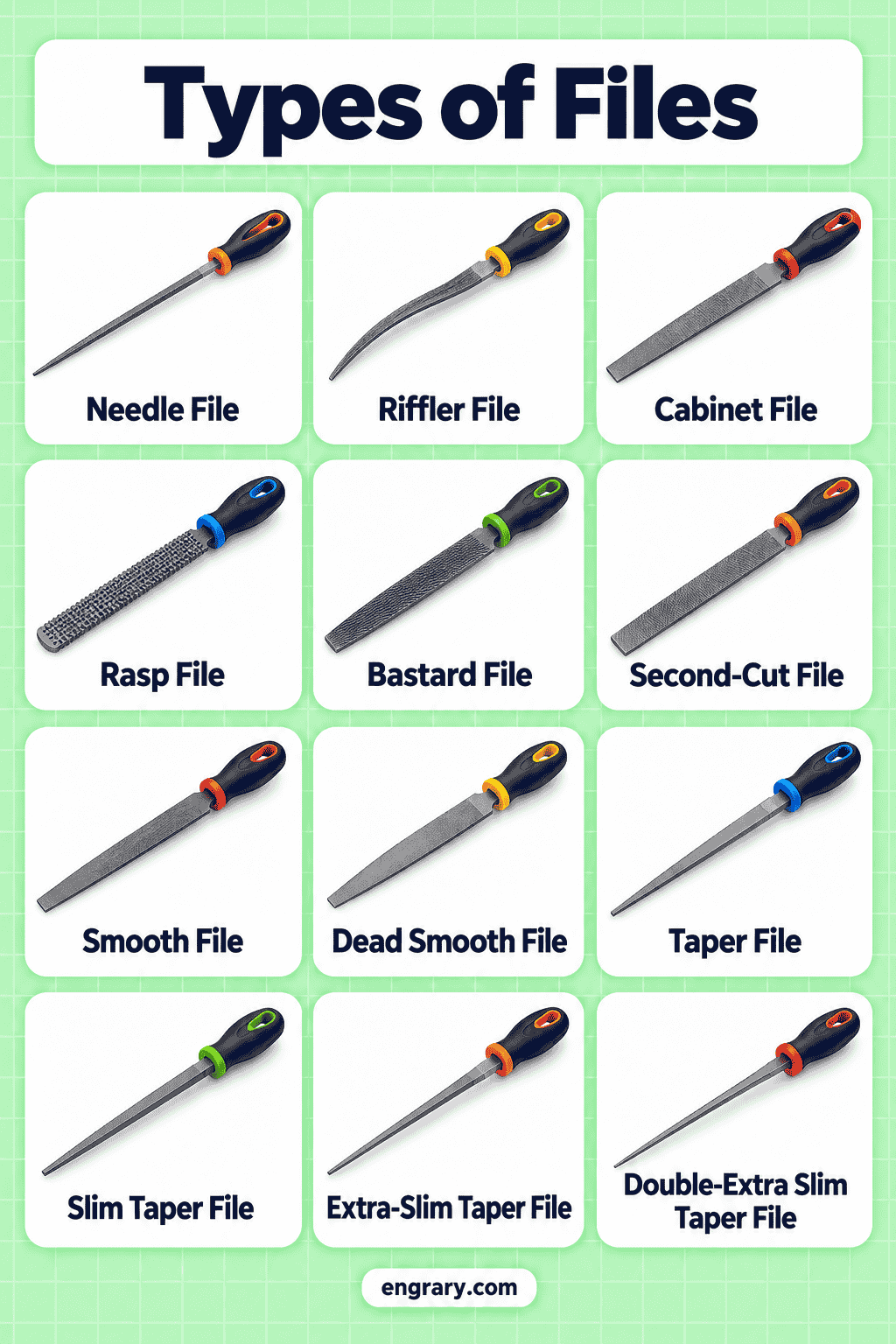
Some precision files become extremely thin or taper sharply toward an edge. Their narrow profiles make them easy to distinguish from broader workshop files.
26. Barrette File
A Barrette File has one principal flat cutting face with sides that taper toward the opposite edge. In many designs, the remaining surfaces act as safe sides or back.
27. Marking File
A Marking File is a narrow precision file with a fine, tapered profile. Its slim body distinguishes it from heavier general workshop files.
28. Feather-Edge File
A Feather-Edge File tapers toward very thin edges, creating a delicate wedge-like profile. Its extremely narrow edges are the main visual difference from a standard Three-Square or Knife File.
Swiss and Precision File Shapes
Swiss-pattern files include many fine profiles intended for detailed work. Their names often refer to cross-section rather than simply to size, while their cut grades use their own numbering systems.
29. Crochet File
A Crochet File is a narrow precision profile with a distinctive rounded or curved working edge. Its unusual cross-section places it among specialty Swiss-pattern file forms.
Needle and Miniature Files
Miniature files reproduce many familiar file shapes at a much smaller scale. Rather than counting every Flat, Round, Square, or Knife version separately, it is cleaner to treat the miniature system as its own file family.
30. Needle File
A Needle File is a small precision file with a thin body and narrow handle or tang. Needle File sets commonly include miniature Flat, Round, Half-Round, Square, Three-Square, and Knife profiles.
31. Escapement File
An Escapement File is an exceptionally small precision file with finer proportions than a standard Needle File. Its miniature body is associated with very detailed fitting and finishing work.
Files with Special Tooth Patterns
File teeth provide another classification system besides cross-section. A file of almost any shape can use different tooth arrangements, so tooth pattern should not be confused with basic file geometry.
A Single-Cut File has one set of parallel tooth rows. A Double-Cut File adds a second crossing set of teeth. Curved-Tooth Files use sweeping curved rows, while rasps rely on individually raised teeth.
These patterns describe the cutting surface rather than automatically creating separate file shapes.
Files Made for Specific Jobs
Some files become recognizable because their profile has been adapted for one particular type of tool or component.
32. Auger-Bit File
An Auger-Bit File is a narrow specialty file with carefully arranged cutting faces and safe edges. Its unusual slim profile separates it from ordinary Flat and Warding Files.
Chainsaw Files, Taper Files, and Thread Restoring Files are also purpose-specific designs, but they already appear earlier because their shapes are important parts of the main file taxonomy.
Rasps and Related File Tools
Rasps belong close to files because both remove small amounts of material, but their cutting surfaces look different.
A conventional file uses organized rows of teeth. A rasp instead has individually raised teeth that create a much rougher surface. This distinction is why Wood Rasp and Cabinet Rasp appear in the list without treating every rasp shape as another separate file type.
How to Tell Similar Files Apart
Several file names describe closely related rectangular, round, or precision profiles. Comparing the cross-section, taper, curvature, and tooth arrangement usually reveals the difference.
| File Types | Main Difference |
|---|---|
| Flat File vs Hand File | A Flat File commonly tapers, while a traditional Hand File has more parallel sides and often includes a safe edge. |
| Flat File vs Mill File | A Mill File is generally slimmer and commonly single-cut, while Flat Files represent a broader heavy-duty rectangular form. |
| Hand File vs Mill File | A Hand File emphasizes parallel rectangular sides and a safe edge, while a Mill File is usually slimmer and tapered. |
| Round File vs Rat-Tail File | Both are circular, but a Rat-Tail File tapers much more noticeably toward the tip. |
| Half-Round File vs Crossing File | A Half-Round File has one flat and one curved face, while a Crossing File has two curved faces. |
| Square File vs Three-Square File | A Square File has four faces, while a Three-Square File has three triangularly arranged faces. |
| Knife File vs Slitting File | A Knife File has a wedge-shaped cross-section, while a Slitting File is extremely thin and comparatively flat. |
| Warding File vs Equaling File | Both are thin rectangular profiles, but Equaling Files are generally more precision-oriented and extremely thin. |
| Warding File vs Pillar File | A Warding File is especially thin, while a Pillar File is a narrow but more substantial rectangular precision file. |
| Barrette File vs Knife File | A Barrette File commonly cuts mainly on one broad face, while a Knife File narrows toward a cutting edge. |
| Round File vs Chainsaw File | A Chainsaw File is a purpose-specific round file made in controlled diameters, while Round File is the broader shape category. |
| Needle File vs Escapement File | Both are miniature precision files, but Escapement Files are generally smaller and finer. |
| File vs Rasp | Files use organized cutting teeth, while rasps use individually raised teeth. |
| Taper File vs Three-Square File | Both may be triangular, but Taper File emphasizes the gradual narrowing body used in saw-file families. |
| Oval File vs Crossing File | An Oval File has one continuous oval section, while a Crossing File has two curved faces with different radii. |
File Cuts and Grades
File cut terminology describes tooth arrangement and coarseness, not the shape of the file itself.
Single-Cut
Single-cut files have one main series of parallel cutting teeth across the face. This tooth pattern is commonly seen on Mill Files and various finishing files.
Double-Cut
Double-cut files have two sets of teeth crossing each other. The crisscross pattern is visibly different from a single row system.
Bastard Cut
Bastard is a commonly used American-pattern coarseness grade. It does not mean a separate file shape; Flat, Half-Round, and other file types can all be produced in this grade.
Second Cut
Second Cut generally describes a finer tooth grade than Bastard Cut. Again, the name refers to coarseness rather than cross-section.
Smooth Cut
Smooth Cut uses finer teeth for lighter finishing work. A Smooth Flat File and a Smooth Half-Round File remain different file shapes despite sharing the same grade.
Swiss-pattern precision files often use numbered cut grades instead of these American-pattern names.
Other Names Used for the Same Files
File terminology varies between trades, regions, and manufacturers. Some names are genuine synonyms, while others overlap only in certain product ranges.
| Main Name | Other Name or Overlapping Term |
|---|---|
| Three-Square File | Triangular File |
| Curved-Tooth File | Vixen File in overlapping trade usage |
| Grooving-related precision profiles | Names vary between Swiss-file catalogs |
| Taper File | Saw File where the triangular taper form is intended |
| Round File | Rat-Tail File when the term is used loosely, although a true rat-tail form is more tapered |
| Wood Rasp | Rasp File in informal usage |
| Slitting File | Thin Slitting File in some catalogs |
| Half-Round File | Half-Round Hand File in some product descriptions |
Because these terms can overlap, cross-section, taper, tooth arrangement, and safe edges are usually more reliable identification clues than the name alone.
Questions People Ask About Files
Common file types include Flat, Hand, Mill, Half-Round, Round, Square, Three-Square, Knife, Warding, Pillar, Taper, Needle, and several Swiss precision profiles.
A Flat File commonly tapers in width and thickness. A traditional Hand File has more parallel sides and often includes one safe edge without cutting teeth.
Both have circular cross-sections, but a Rat-Tail File tapers strongly toward its point. Round File is the broader term for files with circular cross-sections.
A conventional file has organized rows of cutting teeth. A rasp has individually raised teeth that create a visibly rougher cutting surface.
They describe file-tooth coarseness. Bastard is relatively coarse, Second Cut is finer, and Smooth is finer again. They are grades rather than separate file shapes.
You May Also Like



Leave a Comment